
cPanel is a popular web hosting control panel that offers a range of features to simplify website management. One of its most useful features is the ability to Add addons, subdomains, and aliases in cPanel. These features can help website owners to expand their web presence and manage their website’s content more effectively. However, for those new to cPanel, the process of adding addons, subdomains, and aliases can seem daunting.
In this blog, I will walk you through the step-by-step process to add addons subdomains and aliases in cPanel, so you can take advantage of these powerful tools and make the most of your website.
Steps to Add Addons Subdomains and Aliases in cPanel.
Follow these steps to Add Addons Subdomains and Aliases in cPanel.
Steps to Add Addons in cPanel.
To host multiple domains in cPanel, you first need to ensure that your web hosting plan allows for multiple domains to be hosted. You can check eHostingServer, where you can see a plan where you can host up to an unlimited number of websites. Have at least two or more than two Domain .
STEP 1: Login to cPanel. Login using the Username and Password which is provided by your hosting provider.

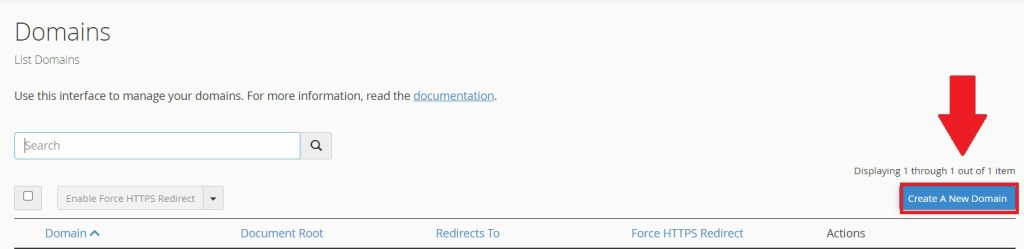
STEP 2: Go to the Domains section under Domain section of cPanel.

STEP 3:Click on Create A New Domain.
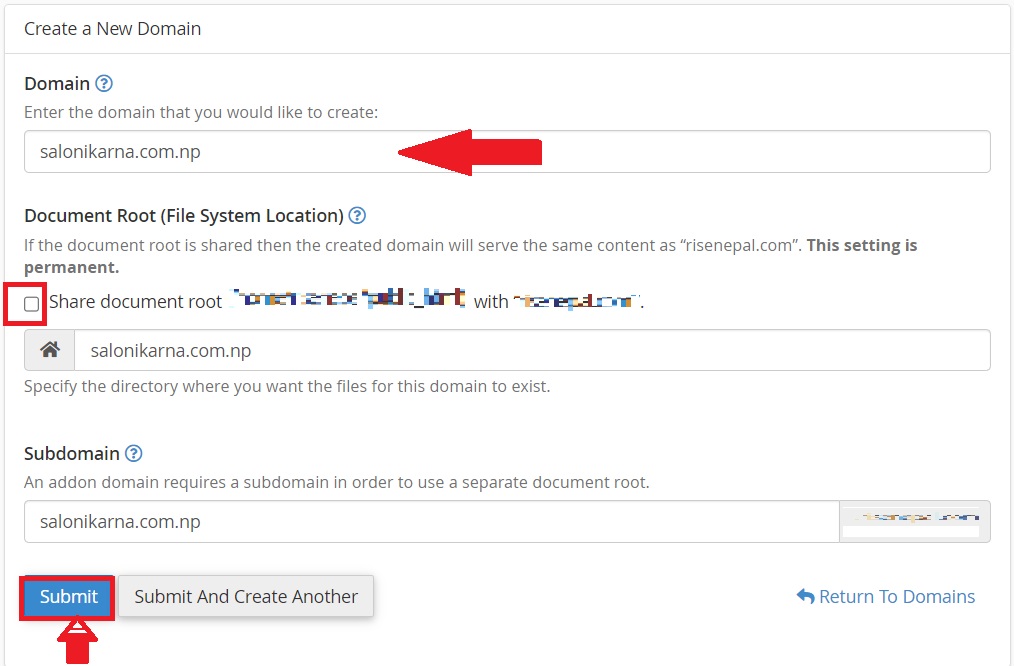
STEP 4: In this section
- Domain: Write the Domain name you want to add. In my case It is salonikarna.com.np.
- Document Root : Uncheck the Share document root. This ensures that the file for this domain is not in the same location as the file for another domain.
Click on the submit button to create the addon domain.
STEP 5: As you can see salonikarna.com.np is successfully added.

Steps to Add Subdomains in cPanel.
A subdomain is a prefix that is added to a domain name to create a new website or online space.
For example, if you have the domain name salonikarna.com.np, you can create a subdomain like blog.salonikarna.com.np, which creates a new website that is connected to your main website but has a different URL.
STEP 1: Go to the Domains section under Domain section of cPanel.
STEP 2: Click on Create A New Domain.
STEP 3: Enter the subdomain name to add in the “Domain” text box.
Deselect the “Share document root (/home/username/public_html) with “domain.tld”.” option.
Enter the directory where you want the files for this domain to exist.
Click the “Submit” button.

STEP 4: As you can see we will be able to add blog.salonikarna.com.np as a subdomain.

Steps to Add Aliases in cPanel.
An Alias is an alternate name or domain that points to the same website as the primary domain. For example, if you have the domain name salonikarna.com.np, you could also create an alias like salonikarna.net, and both URLs would lead to the same website.
All of these aliases could be registered and set up to point to the same website as the primary domain, salonikarna.com.np. This would allow visitors to access the same website using different domain names, which can be useful for branding purposes or for making it easier for customers to find your website.
Follows these steps to add Aliases in cPanel.
STEP 1: Go to the Domains section under Domain section of cPanel.
STEP 2: Click on Create A New Domain.
STEP 3: In the “Domain” text box, enter the domain name to add as an alias. For example I have added salonikarna.net. Ensure that the “Share document root (/home/username/public_html) with “domain.tld”.” option is selected. Click the “Submit” button.

STEP 4: As you can see salonikarna.net is successfully added.

Conclusion
cPanel is a web hosting control panel that provides users with a user-friendly interface to manage their websites and domains. By adding addons, subdomains, and aliases in cPanel, you can create multiple online spaces and make it easier for visitors to find your website using different domain names. With these tools, you can expand your online presence and improve your website’s visibility and accessibility.
Here I have shown how to Add Addons Subdomains and Aliases in cPanel. I have added salonikarna.com.np. as an Addon Domain and blog.salonikarna.com.np as an Subdomain and salonikarna.net as an aliases.
